Database backup management is the process of creating copies of data in a database as a precautionary measure in case of issues such as data loss, system failure, or cyber-attacks. It aims to ensure that critical data can be restored, and operations can resume without major disruptions.
Purpose of Database Backup
- Protect Data: To prevent data loss in case of damage or problems.
- Restore Data: To allow lost or corrupted data to be quickly restored.
- Comply with Regulations: To meet legal or company policies related to data security.
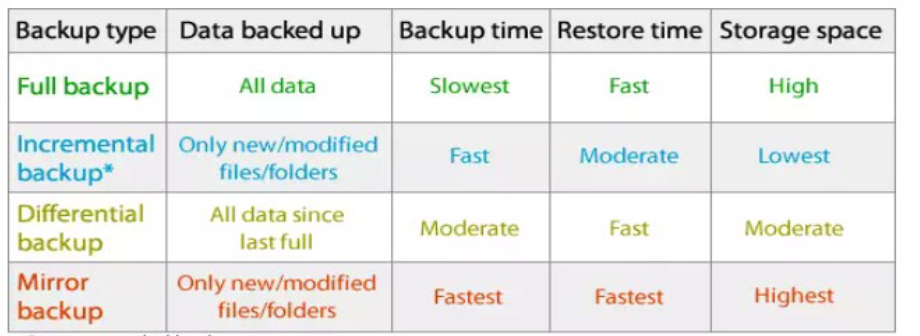
There are various types of backups available, such as Full Backup, Incremental Backup, Differential Backup, and Mirror Backup. Below is a table related to the types of backups available.
1. Full Backup
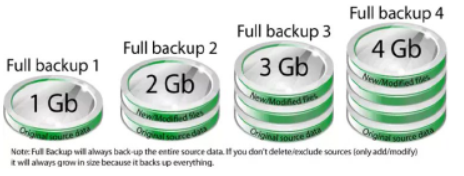
A full backup is the starting point for all other types of backups and contains all the data in the selected folders and files to be backed up. Since a full backup stores all files and folders, frequent full backups result in faster and easier recovery operations. Keep in mind that when you choose other types of backups, restoring may take longer. For example, for a full backup that runs four times, the representation below shows how the backed-up data will grow with each run:
2. Incremental Backup
A mirror backup is similar to a full backup, except that the files are not compressed into a zip file and cannot be password-protected. Mirror backups are most commonly used to create an exact copy of the source data. The benefit of a mirror backup is that the backed-up files can also be easily accessed using tools like Windows Explorer. The image below illustrates how a mirror backup works through four iterations (the first mirror backup will back up everything, while the subsequent mirror backups will only back up new or modified files):

3. Differential Backup
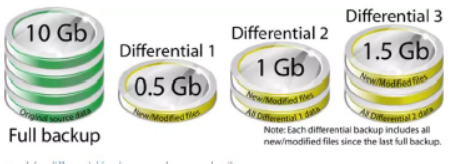
A differential backup contains all the files that have changed since the last FULL backup. The advantage of differential backups is that they shorten recovery time compared to full or incremental backups. However, if you perform differential backups too many times, the size of the differential backup may grow larger than the original baseline full backup. In the image below, you can see an example of how a differential backup would look for a backup job run four times:
4. Mirror Backup
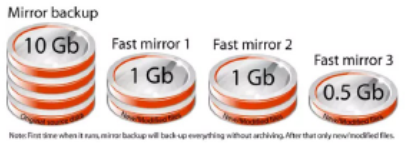
A mirror backup is similar to a full backup, with the exception that the files are not compressed into a zip file and cannot be password-protected. Mirror backups are most commonly used to create an exact copy of the source data. The advantage is that the backup files can also be easily accessed using tools like Windows Explorer. The image below shows how a mirror backup works over four iterations (the first mirror backup will back up everything, and the subsequent mirror backups will only back up new or modified files):
How Backups Are Performed
Backup Scheduling: Backups are performed automatically at specific times. At UPM, backups are typically carried out during the night.
Backup Storage:
- Original Server: Backups are initially stored at the same location as the database before being transferred to the SCP Server.
- SCP Server: This is where the backups are collected before being moved to tape.
- Other Locations: Backups are stored in the Sultan Abdul Samad Library in tape form.
Recovery Testing: Ensures that backups can be restored without issues, based on the plans made by the DBA team.
Efficient backup management helps protect data and reduces the risk of losing critical information. In this way, if any issues arise, data can be restored, and operations can resume without major losses.
Prepared by:
Ts. Rostam Abu Bakar
Timbalan Ketua Bahagian (Pangkalan Data dan Data Raya)
Bahagian Operasi Aplikasi
Pusat Pembangunan Maklumat dan Komunikasi
Date of Input: 28/01/2025 | Updated: 27/03/2025 | zuraya
MEDIA SHARING